
ホワイトペーパーをダウンロード
10GigEおよびそれ以上の通信速度におけるRDMAの利点
このホワイトペーパーでは、RDMA 技術が高速イーサネットマシンビジョンカメラをどのように変貌させるかについて、詳しく説明しています。RDMAの起源と仕組み、RoCEv2規格について、TCPやUDPといった従来のプロトコルとの比較を交えて詳しく解説しています。RDMAが提供するゼロコピー転送機能を強調し、CPUやOSをバイパスしたデータ転送を可能にしていることを紹介しています。さらに、この機能が10GigEおよび25GigEカメラにどのように影響するか、予備的なベンチマーク結果も含め、包括的に紹介しています。このホワイトペーパーを読むことで、RDMA技術がマシンビジョンカメラ業界に与える影響について、貴重な知見を得ることができます。
目次:
– なぜGIGE VISION規格にUDPを使うのか?
– 10GIGEカメラにおけるUDPの課題
– CPUのボトルネックを解消する
– REMOTE DMA OVER CONVERGENT ETHERNET (ROCE V2)
– RDMA接続&転送の手順+注意点!
– GIGE VISIONのためのRDMA
– GPUメモリはどうか?
– UDPとRDMAのベンチマーク比較
– RDMA対応カメラ & アクセサリ
– 高速な未来
フォームに記入して「送信」をクリックすると、ダウンロードリンクが表示されます。
(英語、日本語、韓国語、中国語のPDFがダウンロードできます。)
プレビュー
• Complete hardware offload of packet handling with no CPU involvement through zero-copy; ability to send and receive data to and from remote buffers.
• Comprehensive ecosystem of industrial connectivity solutions offering secure connectors, EMI shielding, ground isolation, and Power over Ethernet (PoE).
• Supported by many vendors of both hardware and software solutions — including Broadcom, Marvell, Nvidia, and Intel — promoting interoperability.
RoCE RDMA transactions use three queues. The send and receive queues handle all the data transaction and are always created together as a queue pair (QP). The completion queue (CQ) is used to track the completion of the work scheduled on the QP. The QPs enables application-level flow control to notify the sender of available buffers for RDMA transfer on the receiver’s end.
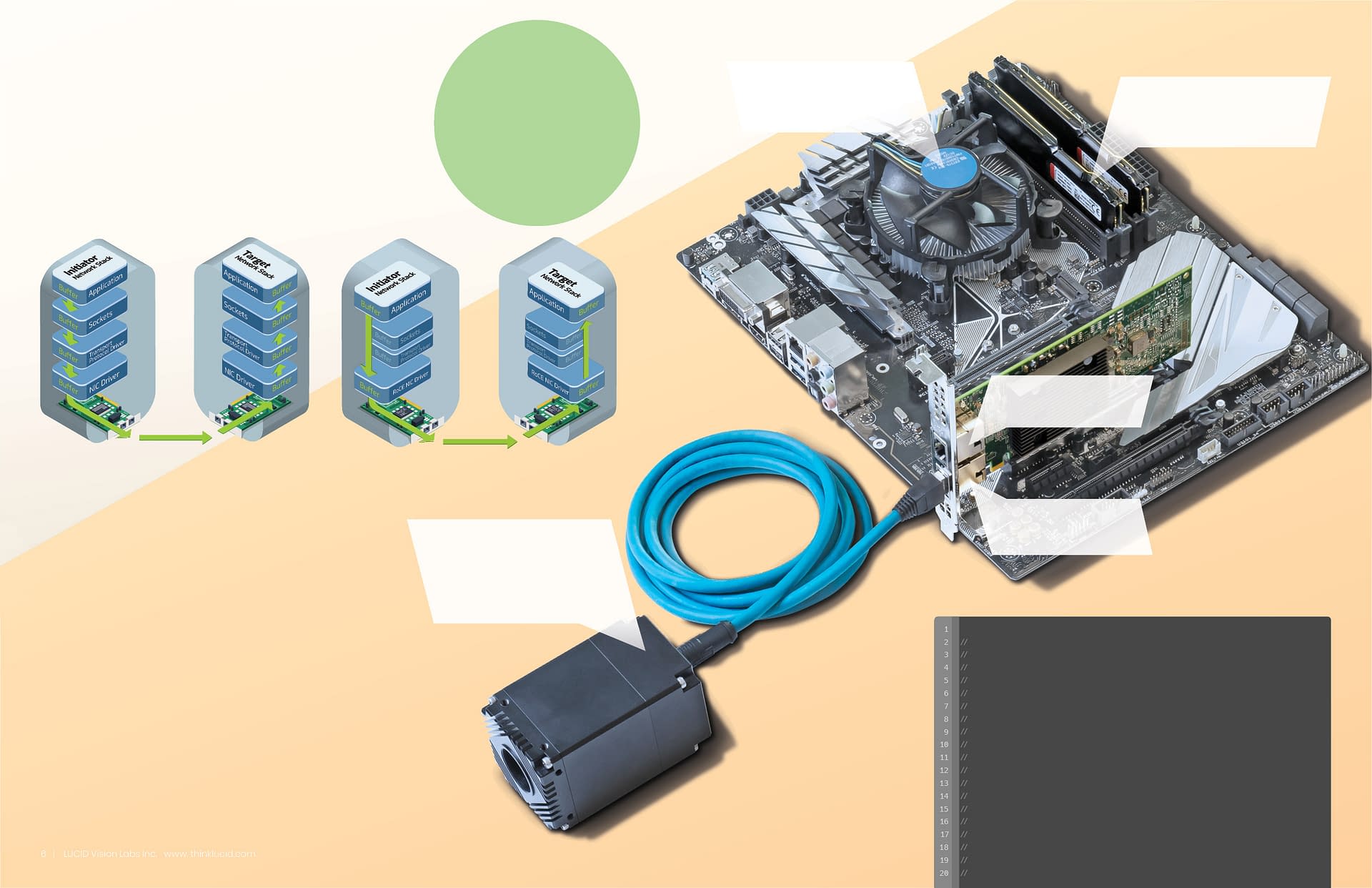
What do you need to enable RDMA with
LUCID 10GigE Cameras?
• LUCID Atlas10 camera with RDMA firmware
• RDMA 10GigE Host Channel Adapter (HCA)
• (Optional) 10GigE Switch with PFC priority-enabled VLAN
• Cat6 or better Ethernet cable
What is needed on the camera:
Camera QP (Send and Receive Queues)
Camera CQ (Completion Queue)
HCA2 QP (Send and Receive Queues)
HCA2 CQ (Completion Queue)
HCA1 QP (Send and Receive Queues)
HCA1 CQ (Completion Queue)
There are two types of Verbs: one-sided and two-sided verbs. One-sided verbs allow remote devices (such as cameras) to completely bypass the CPU/OS when sending data. Two-sided verbs act more like traditional sockets that utilize the CPU/OS. LUCID uses two-sided verbs. Using two-sided verbs still removes several sources of CPU overhead compared to conventional Ethernet data transfers. Using two-sided verbs is necessary for requeuing transfers and polling the CQ. These tasks take up negligible CPU resources.